Up to 30 seconds in one take
Generate 3 to 30 seconds per run, set in 1-second steps. One continuous take keeps the same subject and scene from the first frame to the last, long enough for a complete short story.

Kuaishou's newest video model shoots 3 to 30 seconds in a single take, with stereo sound, lip-synced dialogue and up to 1080p resolution. Direct it with keyframes and references on VideoAI.
This 30-second sneaker spot came out of a single Kling 4.0 run: two runners, one shoe, eight locations and a soundtrack. Tap a beat to jump to it.
Inputs: two model portraits and three product photos. Output: one continuous 30-second clip with music.
Kling 3.0 tops out at 15 seconds. Kling 4.0 runs from 3 to 30 seconds, set in 1-second steps, so a full story no longer needs stitching.
Characters, products and settings stay consistent across every cut, even when the clip moves through several locations.
Write the timing in your prompt, such as "0–5s close-up, 5–12s tracking shot", and the model paces the shots to match.
Longer takes, real sound and finer direction. Turn the sound on to hear each clip.
Generate 3 to 30 seconds per run, set in 1-second steps. One continuous take keeps the same subject and scene from the first frame to the last, long enough for a complete short story.
Dialogue, singing, sound effects and ambience are generated with the picture as two-channel stereo, and mouths stay in time with spoken lines and sung vocals.
Mix up to 10 images, 5 videos (30 seconds in total), 7 elements and voice references. Tell Kling 4.0 what each one controls, from a face to a camera move.
Upload the moments the video must hit, such as a pose, a scene change or a reveal. Use a first frame, first and last frames, or up to 10 keyframes, and the story moves through them in order.
Change an expression, a movement, the camera angle, the background or the style of a clip you upload. Use up to 5 clips per edit, 30 seconds in total, while everything else stays as it was.
Characters speak Chinese, English, Japanese, Korean, Spanish, Portuguese, German, French and more, with accents and dialects. Text, emoji and logos stay sharp while the camera moves.
Each example shows the input it started from and a prompt you can adapt.
A single grid of eight panels showing a lion dance on rooftop pillars, animated as one moving sequence that passes through every panel.
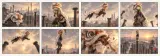
@Image1 is an eight-panel storyboard. Play it as one continuous shot that moves through the panels in order: a lion dance troupe leaps between tall pillars above a city at sunset. Drums and cheering crowd.
A turnaround of a clay astronaut dog plus a panel-by-panel storyboard, generated as a stop-motion chase on a cheese moon.
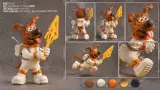
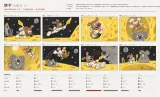
@Image1 defines the clay astronaut dog; keep its design in every shot. Follow the storyboard in @Image2 panel by panel. Stop-motion claymation style, a chase across a moon made of cheese, playful music.
A collage poster animated into a brand spot: paper layers shift, the globe spins and the headline rebuilds letter by letter.

Animate @Image1 as a 14-second brand spot. The torn-paper layers slide apart, the globe turns, the painted hand opens toward the camera and the headline assembles letter by letter. Keep the collage look and colors. Upbeat music.
The tracking shot from one clip, a character turnaround and an empty corridor, combined into a brand-new chase.
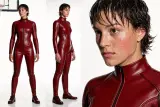
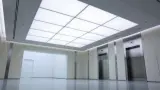
Reference the camera movement of @Video1. The woman from @Image1 runs down the white corridor from @Image2 while the camera tracks close behind her.
A clay pig defined from three angles joins a period drama clip, and the original dialogue carries on around it.
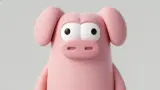


Add the clay pig from @Image1, @Image2 and @Image3 to @Video1, standing among the people by the fireplace. Keep the scene, the dialogue and the camera exactly as they are.
Passers-by are removed from a band's set by a fountain, leaving only the musicians and the plaza.
Remove the passers-by from @Video1 so only the band and the fountain plaza remain. Keep the music and the camera movement unchanged.
From a one-line prompt, Kling 4.0 fills in the character, the set, the camera and the performance, with the speech generated in the same pass.
An old man ranting about AI.
A handheld reunion on a UK street at dusk, with footsteps, street noise, music and English dialogue all written into the prompt.
One continuous 7-second handheld shot on a quiet UK street corner at dusk. Two old friends spot each other, hurry over and hug while people pass by. Natural expressions, slight camera shake, warm nostalgic light. Audio: footsteps, street ambience, soft music, and one says "I can't believe it's you."
Kling 4.0 doubles the length and adds keyframes, stereo audio and far more references.
| Spec | Kling 4.0 | Kling 3.0 |
|---|---|---|
| Length per generation | 3–30 seconds | 3–15 seconds |
| Frame control | First & last frame, up to 10 keyframes | First & last frame |
| References | Up to 15: 10 images, 5 videos (30s total), 7 elements, voice | Up to 7 images/elements, or 1 video (15s) + 4 images |
| Audio | Two-channel stereo, lip sync | Single-channel |
| Spoken languages | Chinese, English, Japanese, Korean, Spanish, Portuguese, German, French and more | Chinese, English, Japanese, Korean, Spanish |
| Resolution | 720p / 1080p | 720p / 1080p |
| Dynamic range | 10-bit HDR at 1080p (coming soon) | 8-bit SDR |
| Aspect ratios | 21:9, 16:9, 1:1, 9:16, Auto | No 21:9 option |
| Prompt length | Up to 8,000 tokens | — |
Specifications from Kling AI's Kling 4.0 release notes and user guide. Availability of each option on VideoAI may vary.
Kling 4.0 follows concrete, timed directions best. Three steps, and a prompt structure you can reuse.
Open the VideoAI video creator, select Kling 4.0 and upload any images, clips or voice samples. They are numbered in order: @Image1, @Image2, @Video1.
Say what each asset controls, for example "@Image1: keep her face and outfit" or "@Video1: copy the camera move". Unassigned references make results less predictable.
Describe the scene beat by beat with timestamps, add the sound you want, pick a length from 3 to 30 seconds and an aspect ratio, and generate.
Kling 4.0 is the latest AI video model from Kling AI, the video team at Kuaishou. It generates 3 to 30 seconds of video in one pass from text, images or up to 15 mixed references, with two-channel stereo audio, lip-synced dialogue, up to 10 keyframes and resolutions up to 1080p. It can also edit videos you upload.
Each generation runs from 3 to 30 seconds, adjustable in 1-second steps, with 10 seconds as the default. That is twice the 15-second limit of Kling 3.0.
Yes. Dialogue, singing, sound effects and ambient sound are generated together with the video as two-channel stereo, and lip sync keeps mouths matched to the words. If you don't want background music or subtitles, say so in the prompt.
Kling 4.0 outputs 720p and 1080p in 21:9, 16:9, 1:1 or 9:16, or Auto. Kling AI has announced 10-bit HDR output at 1080p as coming soon.
Up to 15 per generation: as many as 10 images, 5 videos with a combined length of 30 seconds, 7 elements (up to 3 built from video) and voice references. Refer to each one in the prompt, such as @Image1 or @Video1, and say what it should control.
Keyframes are images of moments your video has to show, such as a pose, a scene change or a reveal. You can set just the first frame, the first and last frame, or up to 10 keyframes, and Kling 4.0 moves through them in order.
Chinese, English, Japanese, Korean, Spanish, Portuguese, German, French and more. You can also ask for accents such as American, British or Indian English and Chinese dialects including Cantonese, Sichuanese and a Beijing accent. Put the spoken line in quotes and name the accent in your prompt.
Yes. Upload one main video, plus up to 4 more clips as references (each 3 to 30 seconds, 30 seconds in total), and describe the change. Kling 4.0 can swap a character or background, remove an object, or change the movement, camera angle or style while keeping the rest of the shot.
Compare Kling 4.0 with the other video and image models on VideoAI.
Write the shot list, add your references and let Kling 4.0 film it, sound included.
Create with Kling 4.0